The most affordable web-based PDF tools for small medical offices.
A small medical office doesn’t have a budget line for enterprise document software, but it still needs merging and splitting to work correctly every time. A missed page in a records request or a botched split in a referral packet causes real problems downstream. A tool that lets you combine PDF files reliably, without a large monthly bill, is what a small staff actually needs.
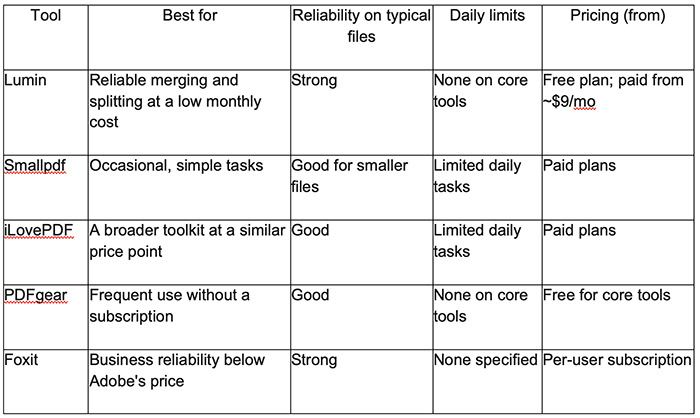
Merge a records request or split a referral packet reliably, without a per-seat price that punishes a staff of four or five. The free plan covers occasional use, and paid plans start around $9 a month if volume grows.
A single quick merge or split runs through a simple interface with almost nothing to learn.
A wider toolkit sits alongside merging and splitting, useful if the office also handles conversion or compression regularly.
Merging and splitting stay free without the tight daily cap most competitors impose, which helps staff working through several patient files a day.
Business-level reliability handles larger files well, at a price below Adobe’s.
A small medical office needs merging and splitting to work correctly the first time, since a missed page in a referral or a records request causes real downstream problems. Lumin handles both reliably, and the pricing doesn’t punish a small staff the way a per-seat platform does. For most day-to-day merging and splitting on a tight budget, Lumin’s low monthly cost and lack of a punitive daily cap cover what a small staff actually needs.
Which PDF tool is both affordable and reliable for a small medical office?
Lumin and PDFgear both avoid per-seat pricing and tight daily caps, which suits a small staff’s typical volume. Foxit is a strong choice specifically for offices handling larger scanned files regularly, at a moderate per-seat cost.
Will a cheap PDF tool actually merge and split reliably?
It depends on the tool and the file. Lumin, PDFgear, and Foxit all perform reliably on typical medical office documents. Very large or heavily scanned files can slow down any browser-based tool, so testing with a real file before committing is worth the few minutes it takes.
Is a free plan good enough for a small practice?
For everyday use, yes. Lumin’s free plan and PDFgear’s core tools both cover typical merging and splitting at no cost. Confirm current free-tier limits before relying on either for consistently high volume.
Do these tools protect patient information adequately?
Check general security credentials like encryption standards before uploading anything sensitive. For documents containing protected health information, confirm HIPAA-related requirements directly with the vendor and your practice’s compliance officer.
How much does per-seat pricing actually cost a small office?
It multiplies directly by staff count, so even four or five accounts on a per-seat platform can add up to a real monthly expense. Lumin’s plan structure avoids that multiplication, which matters specifically for a small team.

Forging the Next 250 Years: Powering the Next Era of American Manufacturing
As manufacturers offer more customization than ever before, managing product complexity has become a critical challenge. Tune in with Dan Joe Barry, Vice President of Product Marketing at Configit, who explores how companies are tackling the growing number of product configurations across engineering, sales, manufacturing, and service. He explains how Configuration Lifecycle Management (CLM) helps organizations maintain a single source of truth for configuration data. The result: fewer errors, faster quoting, and the ability to deliver customized products at scale.
Get In Touch
Google news and SEO compliant, Industry Today’s state-of-the-art digital media platform offers bespoke media campaigns that target key decision makers and buyers to achieve your marketing and promotional goals.

Contribute
Showcase your brand and promote your business to our highly targeted audience. We offer detailed Google Analytics with measurable ROI to assure success. Submit your content for review by our Editorial team who will contact you to discuss the project further.
About Us
Reach Your Targeted Audience and Grow Your Business. Learn more About Industry Today.
Contact Us

© 2026 Industry today. All Rights reserved.